 PathRenamer
Messy downloads in.
Clean media library out.
PathRenamer renames your movies, TV shows and anime the way Plex, Jellyfin, Emby and Kodi expect, takes their subtitles along, and can do it on its own the moment a download finishes.
Version 1.7.0 · Windows 10 and 11 · Docker · Renaming is free
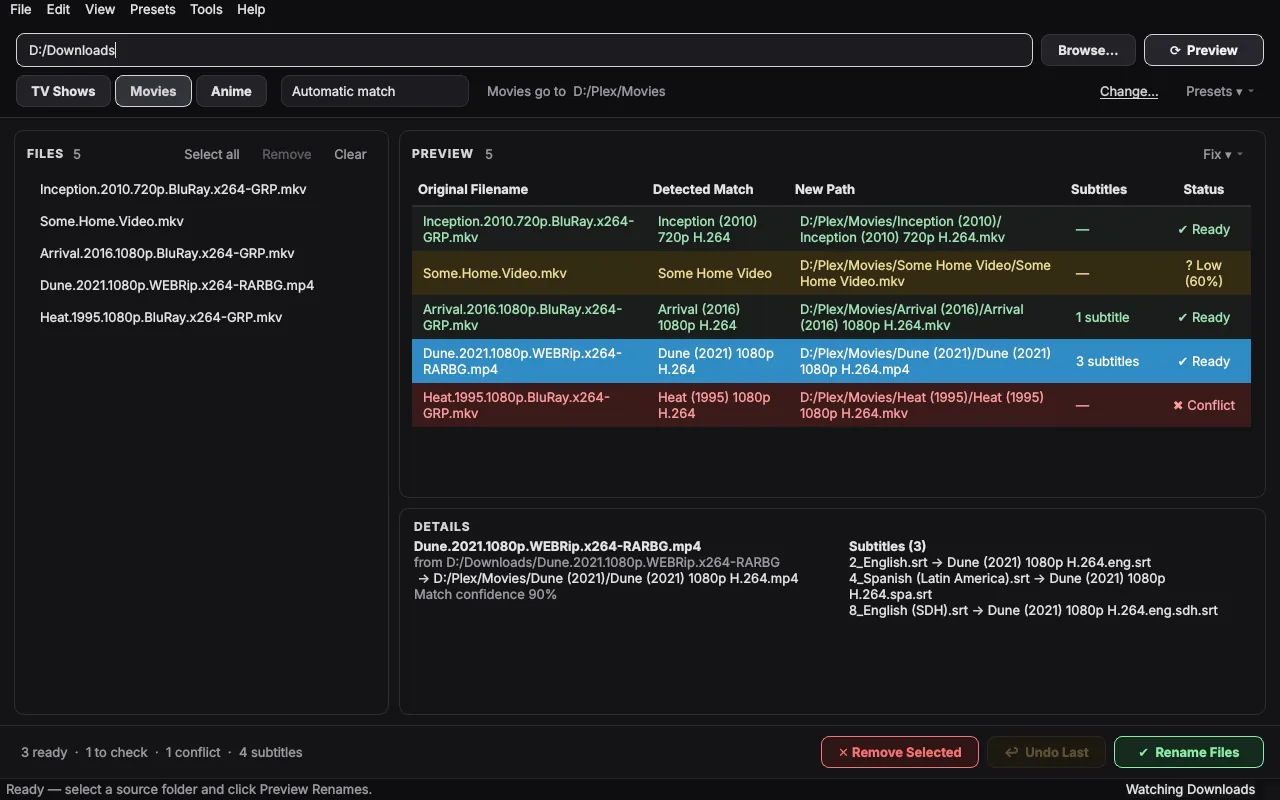
From release names to names your media server understands
Release names are full of tags media servers can't use. PathRenamer finds the real title, year and episode, looks up episode titles, and builds the folders for you.
…/Subs/2_English.srt
…/Subs/4_Spanish (Latin America).srt
Dune (2021) 1080p H.264.eng.srt
Dune (2021) 1080p H.264.spa.srt
Pick your downloads
Drop a folder or files on the window, and choose TV Shows, Movies or Anime.
Check the preview
Every new name is shown before anything moves. Anything unsure is marked, and one right-click fixes a row.
Rename
Files move (or copy, or hard-link) into your library with their subtitles. Changed your mind? Undo.
Everything a tidy media library needs
Names every server knows
Movies, TV shows, anime, multi-episode files, daily shows, specials and movie editions, named the way Plex, Jellyfin, Emby and Kodi match them, and apps like Plezy show them.
Subtitles come along
Subtitles next to the video or in a Subs folder get the right language code: .eng.srt, .spa.forced.srt, .eng.sdh.srt.
Download missing subtitles
Get subtitles from OpenSubtitles.com in your languages; the ones made for your exact file come first. Free by hand, or automatic after every rename with Pro.
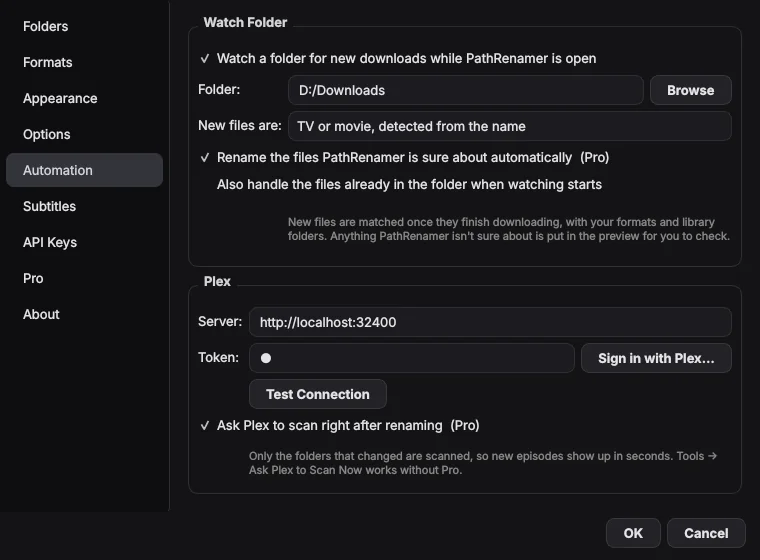
Watch folder
Point it at Downloads. New movies and episodes are renamed into your library as soon as they finish downloading.
Your server scans right away
Connect Plex, Jellyfin, Emby or Kodi once. After each rename it scans just the folders that changed, so new episodes appear in seconds.
Keep seeding
Hard links put files in your library without moving the download or using extra space, so torrents keep seeding.
Undo anything
Undo the last rename, or any earlier one from the rename history, even after a restart.
Quality from the file
No tags in the name? Resolution and codecs are read from the video itself: Home Video (2019) 1080p H.264.
Make it yours
Naming formats, presets, a Modern or Classic layout, and dark, light or custom themes.
Stays out of the way
Closed, it keeps watching from the tray, and it can start with Windows. New versions install with one click.
Docker for servers and NAS
The same renaming on Linux, a Mac, Synology, Unraid or a Raspberry Pi, with every free feature. Set it up.
Free and open source
Renaming and automation are free, for good, and the code is public under the GPL. Pro only covers automatic subtitle downloads, which cost money to run.
Downloads that file themselves
Turn on the watch folder and PathRenamer waits until each download is complete, matches it, and renames it into the right library folder. Files it isn't sure about wait in the preview for you.
Then it fetches missing subtitles and tells Plex, Jellyfin, Emby or Kodi to scan. You just press play.
Before you download
Is PathRenamer free?
Yes. Everything you do by hand is free, for good: previewing and renaming, moving subtitles along, downloading subtitles for files you pick, asking your media server to scan, undo and rename history, hard links, presets and themes. The Docker version for servers and NAS boxes is free too.
PathRenamer Pro is only for what costs money to run: subtitles downloaded automatically after every rename. The automatic Pro features come with a free 14-day trial. See Free and Pro.
What does PathRenamer Pro add?
Missing subtitles in your languages, downloaded automatically after every rename. That's the one part that costs money to run: the subtitle service charges per download. The watch folder, media server scans and everything else are free. Turning automatic subtitles on starts a free 14-day trial. If Pro isn't for you, you get your money back within 14 days of buying.
Does it work with Jellyfin, Emby, Kodi or Plezy?
Yes. The names PathRenamer writes (Movie (Year) folders, S01E01 episodes, .eng.srt subtitles) are the ones Plex, Jellyfin, Emby and Kodi all read. PathRenamer can also ask any of them to scan: connect your server under Settings → Automation → Media Server. Apps that play from these servers, like Plezy, show the new files as soon as the server has them.
Will Windows warn me when I install it?
It can. Windows SmartScreen shows Windows protected your PC for apps from new publishers that don't have a paid code-signing certificate yet. Click More info, then Run anyway. The installer is built by GitHub from the public source code.